# Introduction aux conditions
Les conditions permettent de contrôler la disponibilité des choix offerts au lecteur. Grâce à elles, vous pouvez créer des récits qui s'adaptent dynamiquement aux actions précédentes du lecteur.
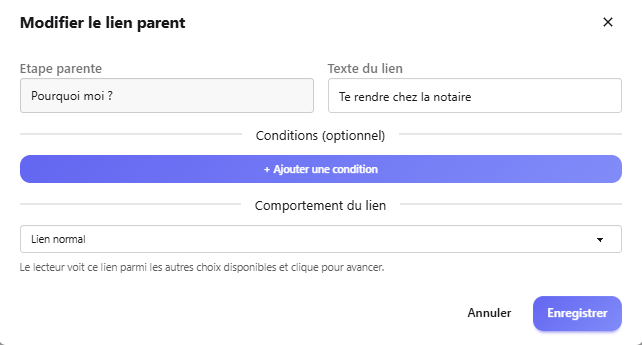
Exemple concret
# Types de conditions
Comparez une variable à une valeur de référence. Vous disposez de plusieurs opérateurs :
- Égal à — La variable doit avoir exactement cette valeur
- Plus grand que — Pour les variables numériques
- Plus petit que — Pour les variables numériques
- Plus grand ou égal — Inclut la valeur limite
- Plus petit ou égal — Inclut la valeur limite
# Configurer une condition
1
Ouvrez l'éditeur d'étape
Accédez à l'étape cible et trouvez la section "Liens parents".
2
Sélectionnez un lien
Cliquez sur le lien parent auquel vous souhaitez ajouter une condition.
3
Ajoutez une condition
Utilisez le menu déroulant pour choisir le type de condition.
4
Configurez les paramètres
Renseignez les valeurs nécessaires (variable, comparateur, valeur...).