# La prévisualisation en temps réel
La prévisualisation vous permet de voir exactement comment vos étapes apparaîtront aux lecteurs, directement depuis l'éditeur. Plus besoin de sauvegarder et de lancer une lecture complète pour vérifier le rendu de votre contenu.
# Ouvrir l'aperçu
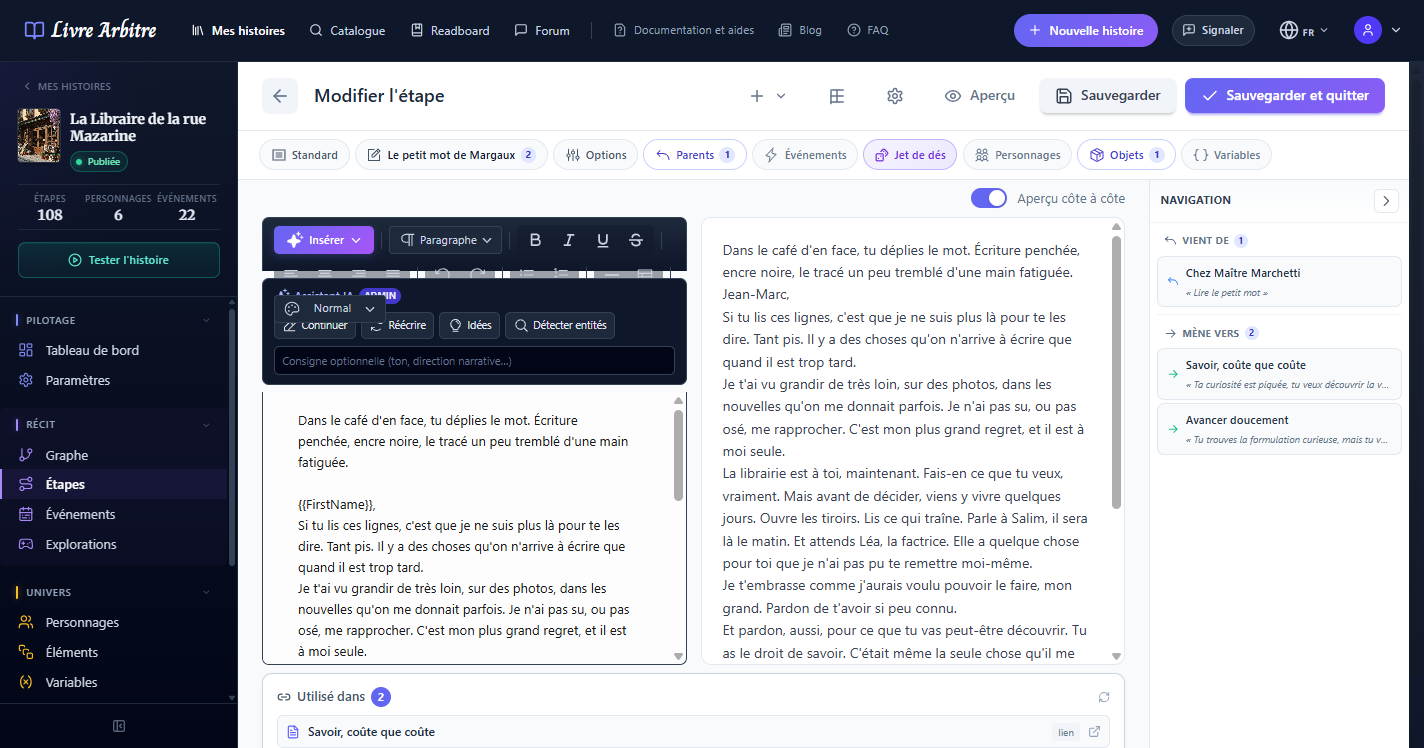
Dans l'éditeur d'étape, le bouton Aperçu (en haut) ouvre le rendu de votre texte tel que le lecteur le verra. Le bouton ⚙ à côté permet de choisir les valeurs des variables utilisées pour cet aperçu.
# Rendu fidèle au lecteur
La prévisualisation reproduit fidèlement le rendu final tel que le lecteur le verra. Cela inclut la mise en forme du texte, les images, les styles et la disposition générale de l'étape.
Vérifiez toujours le rendu
# Tester les remplacements de variables
La prévisualisation permet de vérifier le comportement des variables insérées dans le contenu de votre étape. Les variables entre doubles accolades ({{nom_variable}}) sont remplacées par des valeurs de test pour que vous puissiez visualiser le résultat final.
# Prévisualiser les différents chemins
Depuis la prévisualisation, vous pouvez observer les différents liens et choix disponibles pour le lecteur à cette étape. Cela vous aide à vérifier que les embranchements de votre histoire sont correctement configurés et que les textes des choix sont clairs et engageants.
# Tester les explorations et dialogues
Si votre étape inclut des explorations ou des dialogues avec des PNJ, la prévisualisation vous permet de les tester directement depuis l'éditeur. Vous pouvez ainsi vérifier que les interactions fonctionnent correctement avant de publier votre histoire.