# Qu'est-ce qu'une exploration ?
Les explorations sont des scenes interactives propulsees par l'intelligence artificielle ou les joueurs peuvent explorer librement un lieu, interagir avec leur environnement et decouvrir des indices. Contrairement aux etapes classiques ou le lecteur choisit parmi des options predefinies, les explorations offrent une liberte totale : le joueur peut taper ce qu'il veut et l'IA reagit en consequence.
Une experience immersive
# Creer une exploration
La creation d'une exploration necessite trois elements essentiels : une description de la scene qui plante le decor, des instructions pour l'IA qui definissent le comportement souhaite, et des objectifs que le joueur doit atteindre.
Decrire la scene
Redigez une description detaillee du lieu ou de la situation. Cette description sera presentee au joueur au debut de l'exploration et servira de contexte a l'IA.
Rediger les instructions IA
Ecrivez des instructions precises pour guider le comportement de l'IA : quels objets sont presents, quelles interactions sont possibles, quels secrets peuvent etre decouverts.
Definir les objectifs
Specifiez les objectifs que le joueur doit atteindre pour terminer l'exploration. L'IA detectera automatiquement quand les objectifs sont remplis.
# Lier une exploration a une etape
Une exploration est liee a une etape via le champ explorationId. Lorsque le lecteur atteint cette etape, l'exploration se declenche automatiquement et le mode interactif s'active. L'etape contient le contexte narratif qui introduit la scene d'exploration.
Icone dans la liste des etapes
# Declencheurs d'exploration
Les explorations peuvent deverrouiller des personnages ou des elements en fonction des actions du joueur pendant l'exploration. Par exemple, si le joueur decouvre un objet cache, l'element correspondant peut etre automatiquement ajoute a son inventaire. Si le joueur rencontre un PNJ, la fiche du personnage peut etre deverrouillee dans l'encyclopedie.
- Deverrouillage d'elements — Ajoutez automatiquement des objets a l'inventaire du joueur lorsqu'il les decouvre pendant l'exploration.
- Deverrouillage de personnages — Rendez accessible la fiche d'un personnage lorsque le joueur le rencontre pour la premiere fois.
- Modification de variables — Mettez a jour des variables de l'histoire en fonction des decouvertes du joueur.
# Tester une exploration
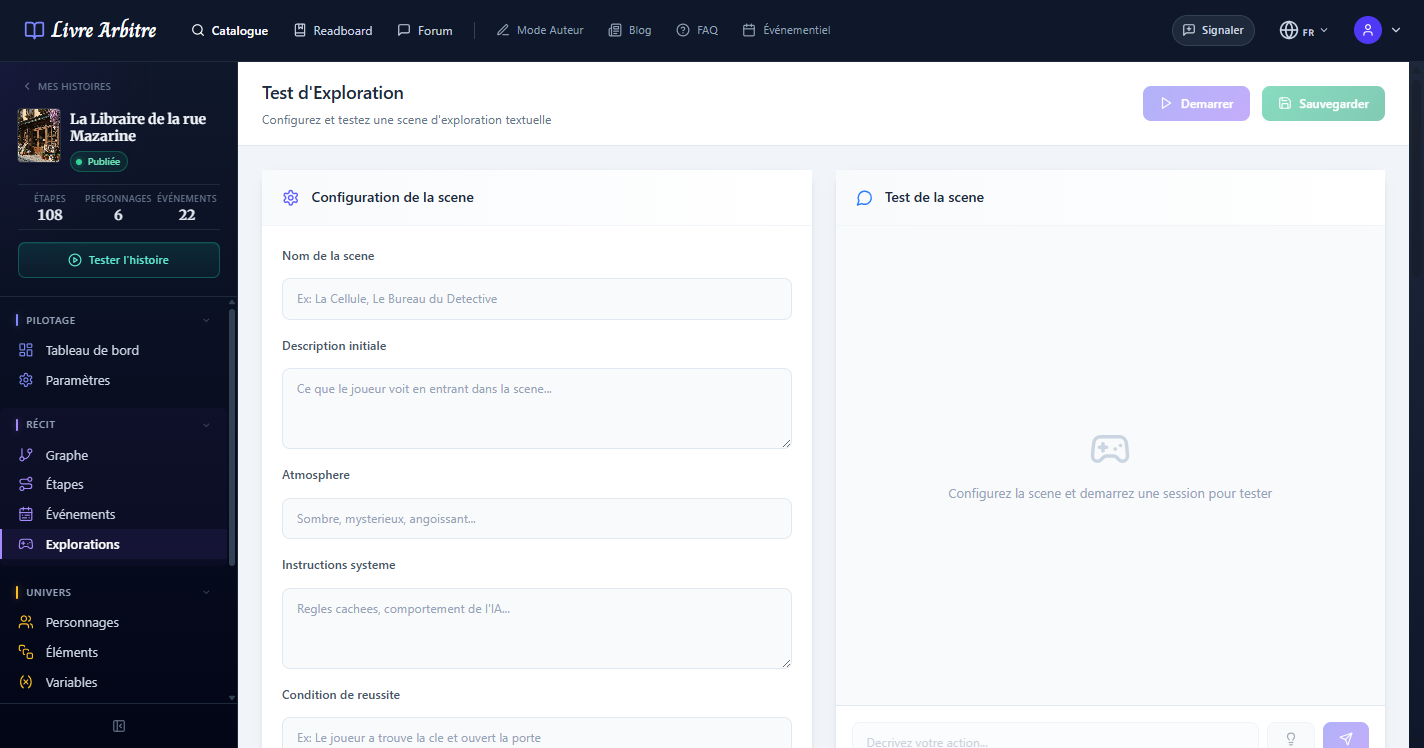
La vue de test des explorations permet aux auteurs de tester leurs explorations avant publication. Vous pouvez interagir avec l'IA exactement comme le ferait un lecteur, verifier que les objectifs sont correctement detectes et ajuster les instructions si necessaire.

# Experience lecteur
Lors de la lecture, l'exploration se presente comme une interface de chat immersive. Le lecteur voit la description de la scene et peut taper librement ses actions. L'IA repond en decrivant les resultats de ses actions et l'evolution de la scene. Les objectifs accomplis sont affiches au fur et a mesure.

# Quand la condition de réussite est remplie
La condition de réussite (ou un élément caché marqué « déclenche la victoire ») débloque la suite de l'étape. Le champ Quand la condition de réussite est remplie choisit ce qui se passe ensuite :
- Terminer l'exploration (par défaut) — la scène se ferme : le lecteur lit la narration de victoire, la saisie disparaît et les choix de l'étape s'affichent.
- Débloquer la suite, laisser chercher — un encadré « Objectif atteint » s'affiche juste après l'échange gagnant et les choix de l'étape apparaissent, mais la saisie reste ouverte : le lecteur peut continuer à fouiller et passe à la suite quand il le souhaite. Le bouton « Quitter les lieux » n'est plus proposé (les choix servent de sortie). La scène se ferme d'elle-même quand tous les éléments cachés ont été trouvés.
Lequel choisir ?
# Une exploration ne se perd pas
Une exploration est unique : le lecteur ne la recommence jamais. En cours ou terminée, elle est conservée tant que la lecture n'a pas quitté l'étape, sans limite de temps : après un rafraîchissement, une fermeture de l'application ou une coupure réseau, le lecteur retrouve tout l'historique, les indices déjà demandés, l'encadré de victoire ou de sortie et les choix débloqués. Seul le rembobinage d'une lecture de test (par l'auteur) la remet à zéro.
Évitez les boucles
# Mot de passe, code, réponse exacte
Quand un élément ne doit se révéler qu'avec une information précise, écrivez cette information juste après le mot-clé de la condition : « La joueuse saisit le mot de passe Honorée, Honorade ou Parette », « Le joueur compose le code 4512 », « Le joueur donne la réponse « Sésame, ouvre-toi » ». Le moteur vérifie alors lui-même que le lecteur a écrit l'une de ces valeurs (dans son action ou l'une des deux précédentes) : « je tape le bon mot de passe » ne suffit pas. Majuscules et accents ne comptent pas ; une faute de frappe est tolérée sur les mots d'au moins 8 lettres.
- Mots-clés reconnus : mot de passe, code, combinaison, réponse, énigme, PIN.
- Valeurs reconnues : mots commençant par une majuscule, nombres, texte entre guillemets, séparés par des virgules, « ou », « et » ou « / ».
- Sans valeur après le mot-clé (« le code inscrit sur la photo », « la réponse à Marie »), ou si la condition propose un autre chemin (« …ou force le cadenas »), c'est l'IA seule qui juge, comme pour les autres conditions.
Vérifiez en test
# Systeme d'indices
Si le joueur est bloque, l'IA peut fournir des indices progressifs pour l'aider a atteindre ses objectifs. Le systeme d'indices est configure dans les instructions de l'exploration et peut aller d'un indice subtil a une indication plus explicite selon le nombre de tentatives du joueur.