# Qu'est-ce qu'une étape d'interception ?
Une étape d'interception est une étape un peu particulière. Elle n'est jamais reliée par des liens parents classiques : elle se déclenche automatiquement quand un joueur arrive sur n'importe quelle étape, à condition que ses critères de déclenchement soient remplis.
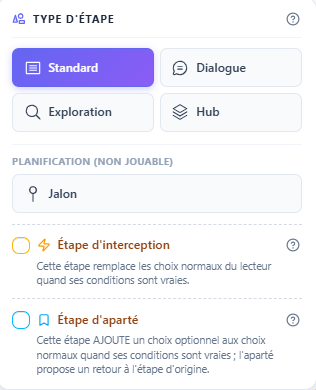
Quand une interception s'active, elle remplace les choix normaux de l'étape sur laquelle le joueur vient d'arriver par un seul choix, qui mène vers l'étape d'interception. Une fois la lecture passée par l'interception, ses propres enfants (s'il y en a) prennent le relais comme une étape standard.
Cas d'usage typique
# Comment l'engine choisit quand intercepter
- Le joueur effectue un choix qui le mène à une étape S.
- Au moment où il arrive sur S, l'engine évalue toutes les étapes d'interception définies dans l'histoire.
- Pour chaque interception : l'audience inclut-elle ce joueur ? L'interception a-t-elle déjà été déclenchée pour lui ? Ses conditions sont-elles vraies ?
- Si plusieurs matchent, celle avec la priorité la plus basse l'emporte (en cas d'égalité, la plus ancienne).
- Le joueur voit alors un seul choix dont le texte est celui que vous avez configuré, qui mène à l'étape d'interception.
- Une fois l'interception traversée, elle est marquée comme déclenchée pour ce joueur — elle ne pourra plus se redéclencher dans la même session.
Une fois par joueur
# Configurer une interception
Dans l'éditeur d'étape, ouvrez la pill Type et cochez Étape d'interception. Le dialogue de configuration s'ouvre alors, et vous saisissez :
| Champ | Rôle |
|---|---|
| Texte du choix unique | Ce que le lecteur clique pour arriver sur l'interception. Soyez évocateur (« Quelque chose ne va pas... », « Un cri retentit »). Évitez « Continuer ». |
| Conditions de déclenchement | Au moins une. Mêmes types qu'un lien parent : variables, événements lus, périodes, joueur courant… |
| Opérateur AND/OR | Comment combiner les conditions entre elles. |
| Audience | Tous les joueurs ou un sous-ensemble. En solo, laissez « tous ». |
| Priorité | Si plusieurs interceptions matchent en même temps, la plus petite priorité gagne. 0 par défaut. |
Combiner avec un sous-type
# Limites à connaître
- Une interception n'a pas de liens parents. Elle est uniquement atteignable via son propre déclenchement.
- Elle peut avoir des enfants (par les liens parents de ces enfants pointant vers elle), pour ré-injecter le joueur dans l'histoire après la pause narrative.
- Le retour aux choix initiaux de l'étape interceptée n'est pas pris en charge automatiquement. Si vous voulez offrir un retour, créez un lien depuis l'enfant de l'interception vers la même étape cible.
- Le checkage des conditions se fait au prochain choix du joueur, pas en temps réel — il y a donc un délai naturel entre la modification de l'état et le déclenchement.