# Les paramètres de votre histoire
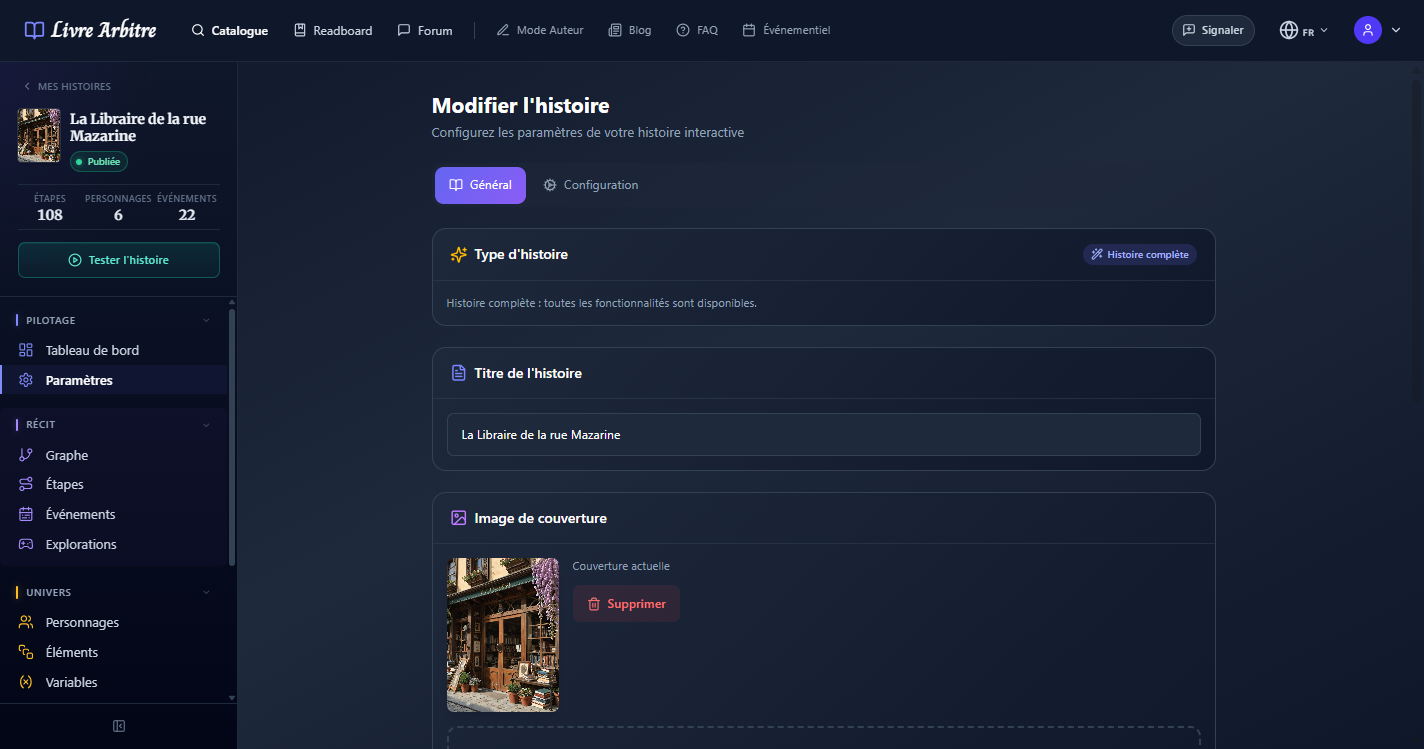
Chaque histoire dispose d'une page de paramètres complète, accessible depuis le tableau de bord de l'histoire via le menu Paramètres. Cette page est organisée en plusieurs onglets qui vous permettent de configurer tous les aspects de votre récit : informations générales, options de jeu, métadonnées et publication.
Prenez le temps de bien configurer
# Onglet Général
L'onglet Général regroupe les informations fondamentales de votre histoire. C'est ici que vous définissez l'identité de votre récit.
| Champ | Description | Conseils |
|---|---|---|
| Titre | Le nom de votre histoire, affiché dans le catalogue et sur la couverture | Choisissez un titre accrocheur et mémorable. Évitez les titres trop longs. |
| Description | Un résumé qui donne envie de lire votre histoire | Rédigez 2-3 phrases captivantes sans révéler les rebondissements majeurs. |
| Image de couverture | L'illustration principale de votre histoire (500 Ko max) | Utilisez une image de haute qualité au format paysage. Les formats JPG et PNG sont acceptés. |
| Langues | Les langues dans lesquelles votre histoire est disponible | Vous pouvez ajouter plusieurs langues et traduire le contenu séparément. |
Support multi-langue
# Onglet Configuration
L'onglet Configuration vous permet d'activer ou désactiver les fonctionnalités de jeu avancées. Ces options enrichissent l'expérience de lecture et transforment votre histoire en véritable jeu interactif.
Mode multijoueur (2-4 joueurs)
Mode démo
Bientôt disponible (Coming Soon)
Impact sur la structure
# Statut de publication
Le statut de publication contrôle la visibilité de votre histoire. Vous pouvez le modifier à tout moment depuis les paramètres.
| Statut | Icône | Description |
|---|---|---|
| Brouillon | Horloge | L'histoire n'est visible que par vous. C'est le statut par défaut. Vous pouvez la tester via le bouton Test du tableau de bord. |
| Test partagé | Flacon | Vous pouvez inviter jusqu'à 3 testeurs par email. Ils pourront jouer l'histoire comme si elle était publiée, et vous pouvez les faire revenir à une étape précédente. L'histoire n'apparaît pas dans le catalogue. |
| Partagé | Cadenas | L'histoire est accessible via un lien direct, mais n'apparaît pas dans le catalogue public. |
| Publié | Coche | L'histoire est visible dans le catalogue et accessible à tous les lecteurs. Assurez-vous qu'elle est complète avant de la publier. |
Rédigez en mode Brouillon
Écrivez et structurez votre histoire sans vous soucier de la visibilité. Testez vous-même les différents chemins narratifs grâce au bouton Test du tableau de bord.
Passez en mode Test partagé
Invitez jusqu'à 3 testeurs par email pour recueillir des retours. Vous pouvez les faire revenir à une étape précédente s'ils rencontrent un problème.
Publiez votre histoire
Une fois satisfait des retours, passez en mode Publié pour rendre votre histoire accessible à toute la communauté.
Revenir en arrière
# Mode test auteur
Le mode test vous permet de jouer votre propre histoire pour vérifier que tout fonctionne correctement. Accessible depuis le tableau de bord de l'histoire via le bouton flacon, il fonctionne quel que soit le statut de publication (Brouillon, Test partagé ou Publié).
- Bandeau Mode Test — Une barre orange permanente identifie clairement la lecture de test, impossible de confondre avec l'expérience lecteur.
- Retour à une étape précédente — Via le bouton Historique, vous pouvez revenir à n'importe quelle étape déjà parcourue. La progression après cette étape est entièrement réinitialisée (variables, inventaire, explorations).
- Aucun impact sur les statistiques — Les lectures de test ne comptent pas dans les stats de votre histoire (nombre de lecteurs, notes, etc.).
- Invitation de testeurs — En mode Test partagé, invitez jusqu'à 3 personnes par email. Elles jouent l'histoire normalement et vous pouvez les faire revenir à une étape précédente depuis votre côté.